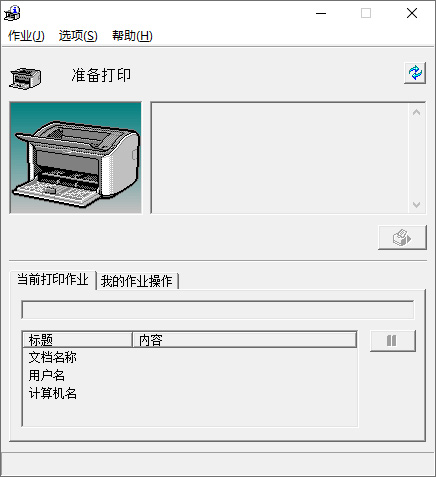
如上是佳能打印机在 Windows 下的 “打印机状态窗口”(Canon Printer Status Window)应用。初次安装佳能 LBP2900/2900+/3000 系列打印机驱动后,每次打印这个窗口都会弹出来提示打印进度。通常对于直连在本机的打印机而言,该窗口不会造成太大影响,
然而,这是一个编写于 2009 年的应用,十几年来,伴随着倒霉催的微软对打印服务子系统的 “修复”,该应用对于 Windows 共享打印机的兼容性逐渐下降,表现为弹出后卡死在“正在获取状态”,打印任务无法开始,虽然强行关闭后可以继续打印,但每次都这样操作未免难受。
2026 年以前,这个问题的解决方案是:当这个窗口出现时,如果在卡顿,就等它卡完,然后点击“选项-首选项”,将“显示打印机状态窗口”配置为“不自动显示”。然而 2026 年的当下,情况起了新变化:
- 对于 Windows 共享打印机,该窗口卡顿的几率大大增加,且不仅主窗口卡,每一步操作都在卡,甚至可能卡接近一个小时;
- 甚至本地连接的打印机也开始出现卡顿的情况。
最终,通过分析应用本身(CNAB4SWD.EXE)的 API 调用情况,找到了上述“不自动显示”的选项在注册表中的位置:
\HKEY_CURRENT_USER\SOFTWARE\Canon\CNAB4\打印机名称项\PSW
上述“打印机名称项”位置,如果是本地连接的打印机,通常是打印机本身的名称(如 Canon LBP2900);如果是 Windows 网络共享的打印机,则为类似如下的项名称,请根据实际情况查看:
,,192.168.0.100,Canon LBP2900
在 PSW 项下,找到 Showing 项目(如果没有就新建一个 DWORD 32位值),数据值为 0。
退出注册表编辑器后,再次打印,应该就没有这个状态窗口出来烦人了。